

Hey there! As a supplier of Light-directed Picking systems, I'm here to chat about the software requirements for these nifty setups. Light-directed Picking is a game-changer in the warehouse and logistics world. It boosts efficiency, cuts down on errors, and helps businesses keep up with the fast - paced market demands.
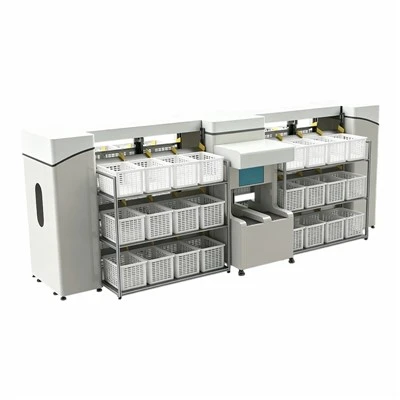
First off, let's talk about what Light-directed Picking actually is. In simple terms, it uses lights installed at storage locations in a warehouse to guide pickers to the right items and the right quantities to pick. It's much faster and more accurate than traditional picking methods. You can learn more about it on our Light-directed Picking page.
Now, onto the software requirements.
User Interface (UI)
The software's UI is the first thing pickers interact with, so it has to be intuitive. A clunky UI can slow down the picking process and lead to mistakes. The interface should display clear instructions about which lights are active, what items to pick, and how many of each. Icons and colors can be used to make the information easy to understand at a glance. For example, green lights could indicate the correct items, and red lights could signal an issue or a special instruction.
The UI also needs to be customizable. Different warehouses have different layouts and workflows. Some might need a list - based view of picking tasks, while others might prefer a graphical representation of the warehouse floor. The ability to customize the UI ensures that the Light-directed Picking system can adapt to the specific needs of each business.
Integration with Warehouse Management System (WMS)
A Light-directed Picking system can't work in isolation. It needs to integrate seamlessly with the warehouse's WMS. The WMS is like the brain of the warehouse, managing inventory, orders, and storage locations. The Light-directed Picking software should be able to receive picking tasks from the WMS in real - time. When a new order comes in, the WMS sends the relevant picking information to the Light-directed Picking software, which then lights up the appropriate storage locations.
After the picking is done, the Light-directed Picking software should send back confirmation to the WMS. This updates the inventory levels in the WMS, ensuring that the inventory data is always accurate. If there are any discrepancies during the picking process, like an out - of - stock item, the software should be able to communicate this to the WMS, which can then take appropriate actions, such as re - routing the order or placing a replenishment request.
Lighting Control
The software has to have precise control over the lights. It needs to be able to turn the lights on and off at the right time and in the right sequence. For example, in a batch picking scenario, where multiple orders are being picked at once, the software should light up the storage locations for each order in an efficient order, minimizing the travel time for the picker.
The software should also be able to adjust the brightness and flashing patterns of the lights. Different environments might require different lighting settings. In a well - lit warehouse, the lights might not need to be as bright, while in a darker area, higher brightness or a more noticeable flashing pattern could be necessary.
Error Handling and Reporting
No system is perfect, and errors can occur during the picking process. The Light-directed Picking software should have robust error - handling mechanisms. If a picker makes a mistake, like picking the wrong item or the wrong quantity, the software should detect this and alert the picker immediately. It can use visual and auditory signals to indicate the error.
The software should also generate detailed reports about errors and other performance metrics. These reports can help warehouse managers identify areas for improvement. For example, if a particular storage location has a high rate of picking errors, the manager can investigate whether there are issues with the labeling or the placement of the items.
Scalability
As a business grows, its warehouse operations will also expand. The Light-directed Picking software needs to be scalable to accommodate this growth. It should be able to handle an increasing number of storage locations, orders, and pickers without a significant drop in performance.
This scalability also means that the software should be able to integrate with additional hardware components if needed. For example, if the warehouse decides to add more light modules or barcode scanners, the software should be able to support these new additions without major overhauls.
Compatibility with Barcode Scanners
Many Light-directed Picking systems use barcode scanners to verify the items being picked. The software should be compatible with a variety of barcode scanners. When a picker scans the barcode of an item, the software should compare the scanned information with the expected item and quantity. If there's a match, the software can confirm the pick and turn off the corresponding light.
This barcode verification step adds an extra layer of accuracy to the picking process, reducing the chances of shipping the wrong items to customers.
Real - Time Monitoring
Warehouse managers need to have real - time visibility into the picking process. The Light-directed Picking software should provide a dashboard where managers can monitor the status of picking tasks, the productivity of pickers, and the overall performance of the system. They can see which orders are being picked, which storage locations are being used, and how long each picking task is taking.
This real - time monitoring allows managers to make informed decisions on the fly. For example, if they notice that a particular picker is falling behind, they can adjust the workload or provide additional training.
Security
Security is a crucial aspect of any software system, especially one that deals with sensitive business information like inventory data and order details. The Light-directed Picking software should have proper security measures in place to protect this information.
This includes user authentication and authorization. Only authorized personnel should be able to access the system and perform certain actions. The software should also encrypt the data being transmitted between different components of the system to prevent unauthorized access.
Compatibility with Other Automated Systems
In modern warehouses, Light-directed Picking systems often work in conjunction with other automated systems, such as Full-automatic Light-directed Put-to-Light Wall and Light-directed Sorting. The software should be able to communicate and integrate with these other systems smoothly.
For example, after the picking is done, the Light-directed Picking system might need to transfer the picked items to a sorting system. The software should be able to send the necessary information about the items to the sorting system, ensuring that the items are sorted correctly.
If you're in the market for a Light-directed Picking system and want to learn more about how our software meets these requirements and can transform your warehouse operations, don't hesitate to reach out. We're here to help you optimize your picking process and take your business to the next level.
References
- Industry reports on warehouse automation
- Case studies of successful Light-directed Picking implementations