

Hey everyone, it’s Sam from [Our Company Name]—the team that builds those smart forklifts you’ve probably been seeing pop up in modern warehouses lately. If you’ve ever wondered what makes a Smart Automated Forklift actually work, instead of just looking like a fancy robot driving around moving pallets, you’re in the right spot. We’ve installed hundreds of these units, talked to dozens of warehouse managers, and fixed our fair share of software kinks, so I’m gonna break down exactly what software you can’t skip if you’re serious about automating your material flow. No stuffy industry jargon, just the real stuff we test every single day.
First off, let’s be clear: a Smart Automated Forklift isn’t just a regular forklift with a computer bolted to the top. If you try to pull that off, you’ll end up with a machine that crashes into walls, gets lost in a 100,000 sq ft warehouse, and wastes more time than a driver who’s still looking for their keys. The software is the brain—without it, you’ve got a really expensive paperweight that can lift pallets, but not much else. Let’s start with the basics that make the forklift even remotely functional, and then move to the stuff that makes it actually smart.
The Core Navigation Software (No Getting Lost All the Time)
This is the make-or-break stuff. If your forklift can’t get from Point A to Point B without a human hitting “re-route” every 10 minutes, it’s useless. We’ve tried a bunch of navigation setups over the years, and the best one for most warehouses right now is SLAM—Simultaneous Localization and Mapping. In plain English, that means the forklift builds a map of your warehouse as it drives, and constantly checks its position against that map in real time. No need for pre-laid wires on the floor (those get worn out, moved, or covered by new pallets) or extra QR codes stuck to walls (who has time to place 500 QR codes in a busy DC?).
Wait, but SLAM alone isn’t enough. You need the navigation software to handle dynamic obstacles too. Warehouses are chaotic—one minute a pallet jack is crossing the aisle, the next a forklift from another vendor is zipping by. If your software thinks everything that moves is a permanent wall, it’ll stop dead in its tracks and hold up the whole workflow. That’s why we pair SLAM with 2D and 3D LiDAR, plus camera-based object detection, all integrated into the navigation stack.
Oh, and for places with super tight, repetitive routes (like a freezer warehouse where pallets always go from dock to rack 12B), we also do magnetic tape navigation as a secondary layer—works like a charm for those fixed moves. If you want to see how we structure this for different use cases, check out our Warehouse Driverless Forklift page—we tailor the navigation software exactly to your space, not just slap on a one-size-fits-all code.
Fleet Management Software (You Can’t Run Just One—Trust Us)
Most warehouses don’t have just one forklift. You’ve got 5, 10, 20 units all moving at once, and if they’re all doing their own thing, chaos is guaranteed. That’s where fleet management software comes in. This is the command center—we use a web-based dashboard (no clunky desktop app you have to install) that lets you see every single smart forklift on your map, track their battery life, assign tasks, and spot bottlenecks in 2 clicks.
Here’s a big tip from experience: the fleet software needs to communicate seamlessly with your existing warehouse management system (WMS). If it can’t, you’re basically manually telling the forklifts where to go, which defeats the whole point of automation. For example, if your WMS says “we need 20 pallets from dock 3 to rack zone 5,” the fleet software should automatically split that task between 3 forklifts, send them on non-overlapping routes, and flag if a forklift’s battery is dying mid-task so it can swap out at the charging station before it gets stuck.
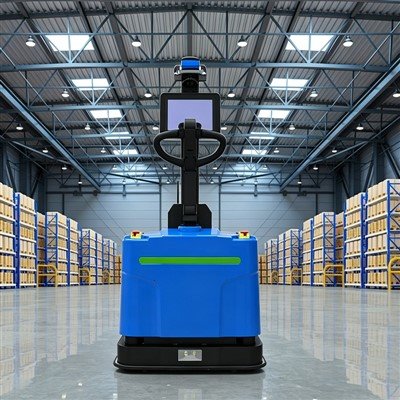
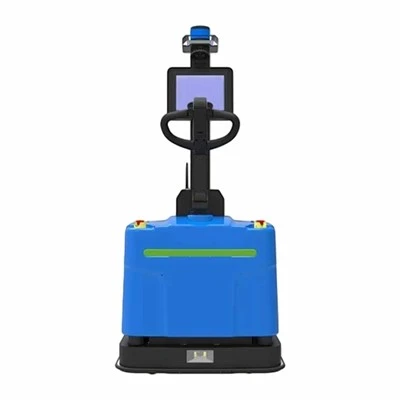
We built this into all our units, including the Automated Forklift Robert—our most popular model for mid-sized warehouses, perfect if you’re moving 1,000+ pallets a week. Robert’s fleet software even sends you a text alert if a task runs late, so you don’t have to stare at the dashboard all day. No more surprises like, “Wait, why haven’t those pallets been moved yet?”
Load Handling Software (Breaking the Pallet—Don’t Do That)
This is the part that’s way trickier than it sounds. A forklift’s whole job is picking up pallets, right? If the software can’t align the forks with the pallet’s pockets perfectly, you’ll either miss the pocket (and have to re-do the move) or drop the pallet (costing you thousands in damaged goods and downtime).
Modern load handling software uses machine vision to scan each pallet as it approaches. The camera on the forklift takes a quick pic, adjusts the fork angle and depth in milliseconds, and locks in—even if the pallet is slightly askew (which they always are, let’s be real). We also programmed our load software to account for uneven warehouse floors. If the floor has a small dip or a raised seam that would throw the fork off, the software adjusts the mast height in real time to keep the pallet level.
Another big one: the software needs to detect how much a pallet weighs before lifting it. Why? Because a standard forklift can only lift 3,000 lbs, and if you try to lift 4,000, you risk tipping over. We integrated load sensors into the forks, and the software calculates the weight in 0.5 seconds. If it’s too heavy, it sends an alert to the fleet manager and refuses to move—no more overloaded forklifts crumpled in a corner. For more on how we handle load precision, check out our Material Transfer Forklift page—we designed that unit specifically for high-frequency, consistent pallet transfers between docks and storage.
Safety Software (Non-Negotiable—We Care as Much as You Do)
Let’s get real: warehouse safety isn’t just a buzzword. OSHA has stats, but we don’t need those to know that a forklift crash can hurt someone, or shut down your whole operation. The software has to be built for safety, not just convenience.
First, there’s geo-fencing. You can set up virtual “no-go” zones—like areas near loading docks where people are always walking, or high-rack areas where turning radius is tight—and the forklift will automatically slow down or stop before entering. We’ve even got dynamic speed adjustment: forklifts go 5 mph in wide aisles, 2 mph near doors, and 1 mph when picking up or dropping off pallets. That’s all controlled by the navigation software, no driver (or in this case, no software operator) needed to adjust it.
Second, there’s human detection. The camera and LiDAR aren’t just for finding obstacles—they’re for finding people. If a worker steps into the forklift’s path, the software triggers an immediate emergency stop, way faster than a human driver could react. We tested this with our team walking in front of a moving smart forklift (don’t worry, it’s in a closed test facility) and it stopped in under a second. No skips, no delays. For more on how we integrate this safety layer, check out our Warehouse Automated Stacker page—those units work in super tight aisles (10 ft wide, instead of 12 or more) so safety is non-negotiable there.
Maintenance & Diagnostics Software (Don’t Wait Till It Breaks)
Here’s the thing about machines: even the best ones break, usually at the worst time. The good news is, modern smart forklift software can predict issues before they become problems. We built predictive analytics into our maintenance software—every forklift sends data back to the fleet dashboard every minute: battery temperature, fork alignment accuracy, motor load, even how often it’s stopping and starting.


If the software notices that a battery is running 10°F hotter than normal, it flags it for a maintenance check before it fails mid-shift. If the fork alignment is off by a small amount (way before it starts missing pallets), it alerts the tech to adjust it, not when you’ve just had a pallet drop and lost 2 hours of work. We also have real-time diagnostics—if a sensor stops working, the software tells you exactly which one, so you don’t spend 2 hours troubleshooting.
This is a game-changer for small teams that don’t have a dedicated forklift mechanic. Our maintenance software even creates work orders automatically if you connect it to your IT system, so the team knows exactly what to fix and when.
Final Thought—It’s All About Integration, Not Just Cool Features
I’ve seen warehouse managers splurge on the fanciest smart forklift with all the bells and whistles, only to realize it won’t talk to their WMS, so it’s barely more useful than a manual forklift. That’s why at [Our Company Name], we built all this software to work together seamlessly, and to integrate with almost every major WMS, ERP, and inventory system out there.
If you’re tired of dealing with manual forklifts that miss pallets, get lost, or cause safety issues, it’s worth taking a hard look at what your current forklift software is missing. A Smart Automated Forklift isn’t just a robot—it’s a system of software layers working together to make your warehouse faster, safer, and cheaper to run.
If you want to chat more about what the right software setup would look like for your space, or see a demo of our units, reach out to our team—we’d love to help you figure it out.
References
- OSHA. (2023). Forklift Safety Guidelines for Automated Systems. Occupational Safety and Health Administration.
- Robotics Industry Association. (2022). State of Autonomous Material Handling in Warehouses. RIA.
- [Our Company Name] Internal Testing Reports: Automated Forklift Navigation and Load Handling Software, 2021–2024.